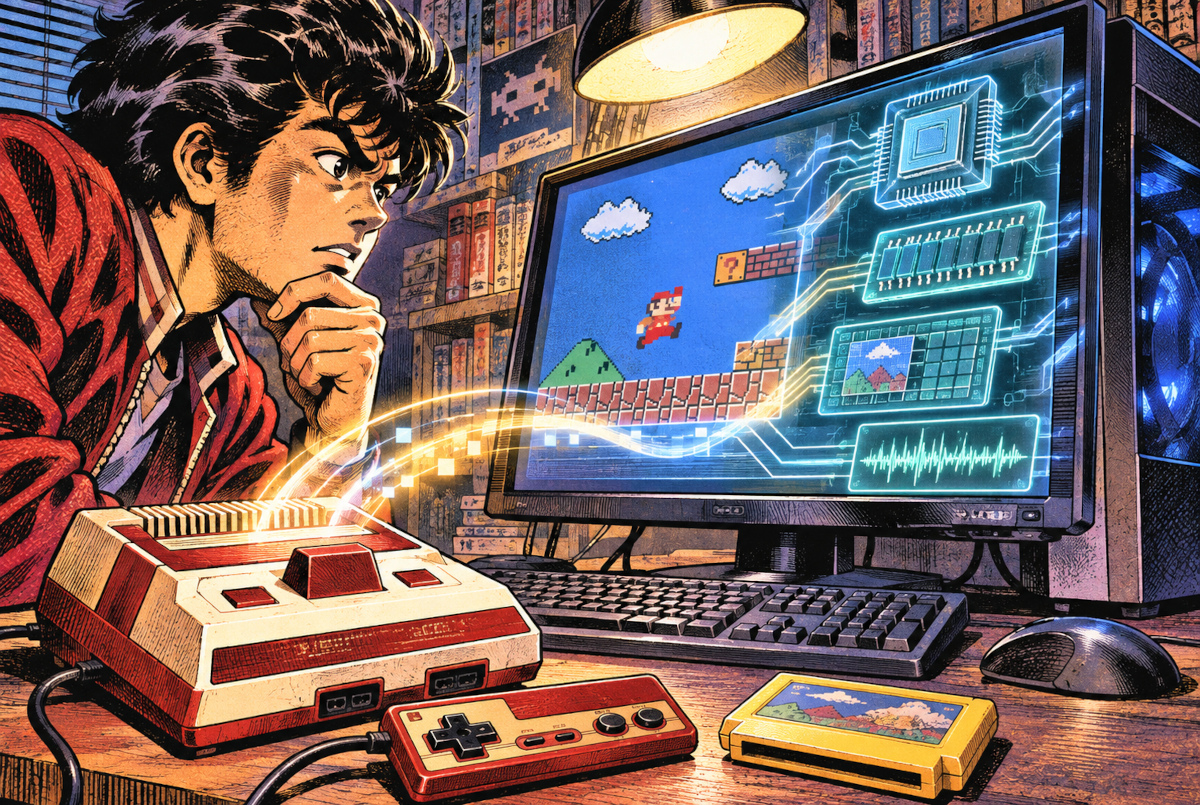
There is nowhere to plug a Famicom cartridge into an ordinary Windows PC. The processor is different. The graphics hardware is different. Even the way the console handles sound and controller input is different.
Yet with the right emulator and game data, software written for Nintendo’s 1983 Family Computer can run on a modern PC. How does that work?
Following that question leads somewhere unexpected: the history of emulation reaches back to IBM computers operating 18 years before the Famicom was released. And the real challenge is not simply making an old game appear on a screen.
An Emulator Recreates the Machine, Not Just the Picture
An emulator allows one computer or system to reproduce the behavior of another. In video game emulation, that can mean recreating the original console’s CPU instructions, memory behavior, graphics hardware, sound generation and controller inputs.
Consider Nintendo’s Famicom, known internationally through its closely related Nintendo Entertainment System (NES). Its games contain instructions intended for that hardware. A modern PC processor cannot simply execute every instruction as though it were running on the original console.
Instead, an emulator interprets or translates the relevant instructions and reproduces the behavior expected by the game. It also handles interactions with the console’s memory and specialized hardware.
That last part is important. It is not enough to draw something resembling the original game. When the program reads a memory location, requests a graphics operation or responds to a controller button, the emulated system must behave closely enough to the real machine.
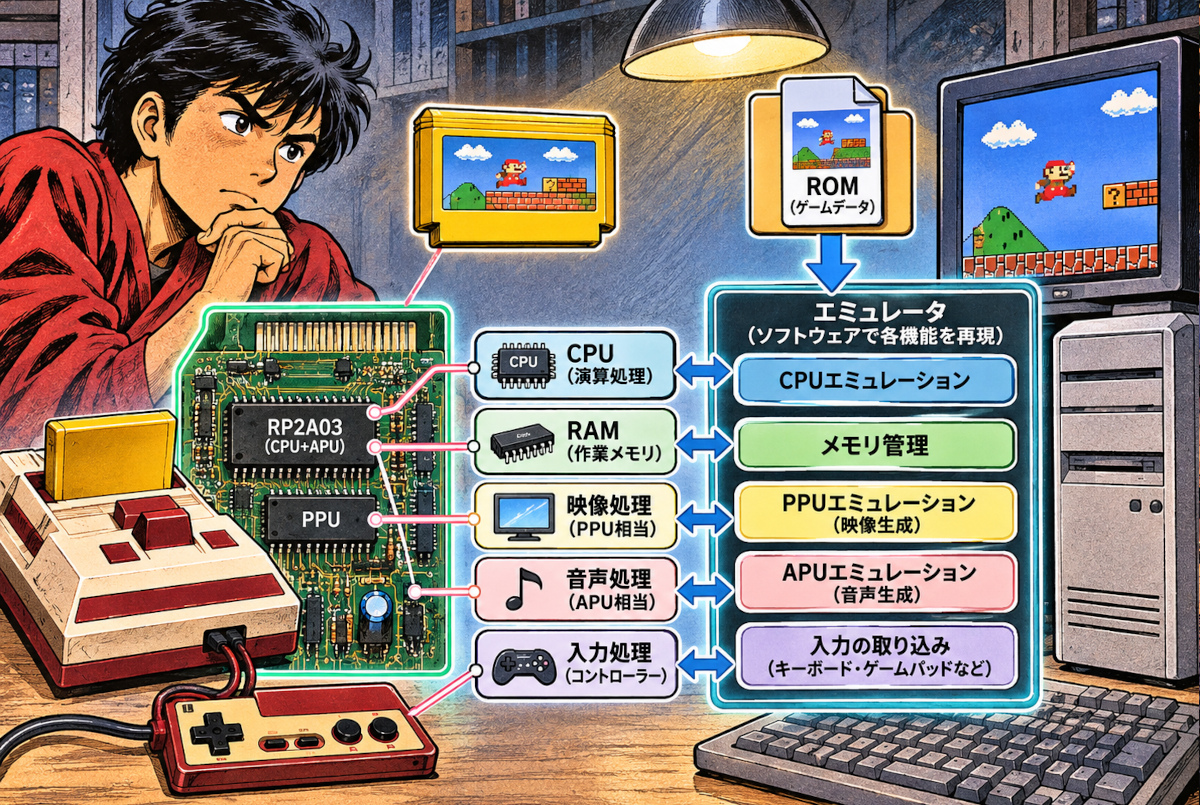
Conceptual illustration of hardware functions and their software equivalents. The Japanese labels identify CPU processing, working memory, graphics/PPU, sound/APU and controller input. In the original Famicom, the CPU and audio processing unit share the RP2A03 chip, while RAM and the PPU are separate. The illustrated board layout, wiring and connectors are not exact replicas. Game ROM data must be supplied separately to the PC.
The emulator itself is also separate from the game data. A ROM image is a file containing data from a cartridge or other storage medium. Some systems additionally require firmware, such as a BIOS, to reproduce the original machine’s behavior.
That distinction matters both technically and legally: an emulator is not the same thing as the copyrighted games or firmware it may use.
Before the Famicom, IBM Was Already Emulating Older Machines
Video game preservation was not the original reason for developing emulation technology.
IBM introduced its 1401 business computer in 1959. It was used for work such as accounting, inventory control and payroll processing. In April 1964, IBM announced the System/360 family, a major step toward making different computer models compatible with a common software architecture.
But what about customers who had already invested in programs written for older IBM computers?
One answer arrived with the IBM System/360 Model 30, which shipped in 1965. It offered an optional capability for running programs originally written for the IBM 1401. That compatibility was implemented with the help of microcode.
The method was not the same as running a modern software-based console emulator on a PC. The principle, however, was remarkably familiar: make a newer machine behave like an older one so existing software can continue to run.
That made practical business sense. Rewriting years of accounting, billing and payroll software for every hardware upgrade would have been expensive and disruptive.
Nintendo released the original Famicom in Japan on July 15, 1983.
1983 – 1965 = 18 years.
This is not a claim that IBM invented all forms of emulation in 1965. It is a documented example showing how far back the practical idea goes.
Long before gamers wanted to preserve old consoles, businesses needed to preserve the software they had already paid to develop.
The 1990s Turned Emulation into a Gaming Phenomenon
As personal computers became more capable during the 1990s, developers increasingly attempted to recreate the behavior of arcade boards and home game consoles in software.
One landmark was MAME, originally short for Multiple Arcade Machine Emulator. Version 0.1 was released on February 5, 1997. Its initial supported games included Pac-Man, Pengo, Lady Bug and other arcade titles.
MAME was not the first video game emulator, but it became one of the most important projects in the preservation of arcade hardware and software.
Another milestone came in 1999, when Connectix introduced Virtual Game Station for Macintosh computers. It allowed users to play Sony PlayStation games without running them on the original console.
Sony challenged Connectix in court. On February 10, 2000, the US Court of Appeals for the Ninth Circuit ruled that certain intermediate copies of Sony’s BIOS made during Connectix’s reverse engineering were protected by fair use. The court ordered the preliminary injunction against Connectix to be dissolved.
That decision was significant, but it did not establish that every emulator or every use of copied game software was legal. The ruling concerned particular activities and the circumstances of that case.
By 2006, emulation had also become part of Nintendo’s own commercial approach to classic games through the Wii Virtual Console service.
Here is a useful number from Nintendo’s Japanese announcement dated March 26, 2009: the service offered 426 downloadable titles covering eight older platforms.
Those were the Famicom, Super Famicom, Nintendo 64, Master System, Mega Drive, PC Engine and Neo Geo, plus the MSX home-computer platform. The six arcade titles launched that same day under Virtual Console Arcade were counted separately.
In other words, the 426-title figure covered seven console families and one home-computer platform, rather than eight console families.
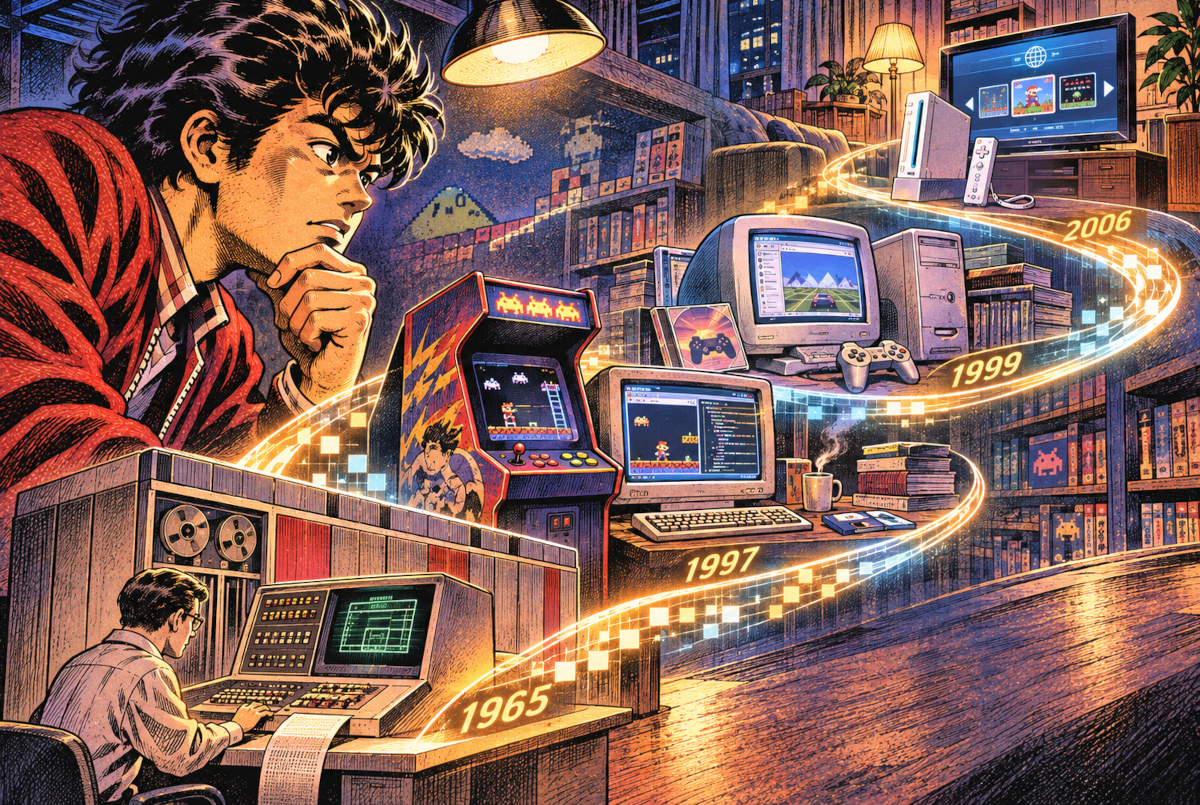
Illustrated milestones in the history of emulation. The timeline represents the IBM System/360 Model 30 in 1965, MAME in 1997, the Macintosh version of Virtual Game Station in 1999 and Nintendo’s Wii Virtual Console in 2006. Hardware appearances and software screens are artistic representations, not historically exact reproductions.
Independent developers and commercial companies pursued emulation for different reasons, but by the 2000s the same broad technology had become useful both for enthusiast projects and for official re-releases of classic games.
Of course, the technical implementation varies from system to system. Not every official re-release uses the same approach.
The Game Boy’s Screen Does Not Actually Refresh at 60 Hz
So far, emulation may sound straightforward: reproduce the instructions, graphics and sound, and the game should work.
Unfortunately, hardware has another habit that complicates everything. It does things at very specific times.
Take the original Game Boy. Its display timing is often rounded to 60 frames per second, but the actual figure is slightly lower.
According to the Game Boy hardware documentation collected in Pan Docs, the system uses a basic timing frequency of 4,194,304 Hz. Each display frame spans 154 scanlines, with 456 timing units, usually called dots, per line.
That gives us:
456 × 154 = 70,224 dots per frame
Now divide the basic timing frequency by the number of dots in each frame:
4,194,304 ÷ 70,224 ≈ 59.7275 frames per second
So the original Game Boy operates at approximately 59.73 Hz, rather than exactly 60 Hz.
The difference is only about 0.45%, measured relative to 60 Hz. Small enough to overlook? Perhaps when watching the screen. Not necessarily when reproducing the hardware’s behavior.
There is another detail worth investigating. The original Game Boy displays 160 × 144 pixels, and its visible image occupies 144 of the 154 scanlines.
What happens during the remaining ten lines?
They form the vertical blanking period, or VBlank, when the display is not actively drawing the next visible image.
As each scanline takes the same 456-dot interval, we can calculate the fraction of an entire frame devoted to this period:
10 ÷ 154 × 100 ≈ 6.49%
That means approximately 6.5% of each frame’s timing is spent in those ten non-visible lines.
And the machine has not simply stopped working. CPU execution, interrupts and access to hardware resources continue to matter during this period.
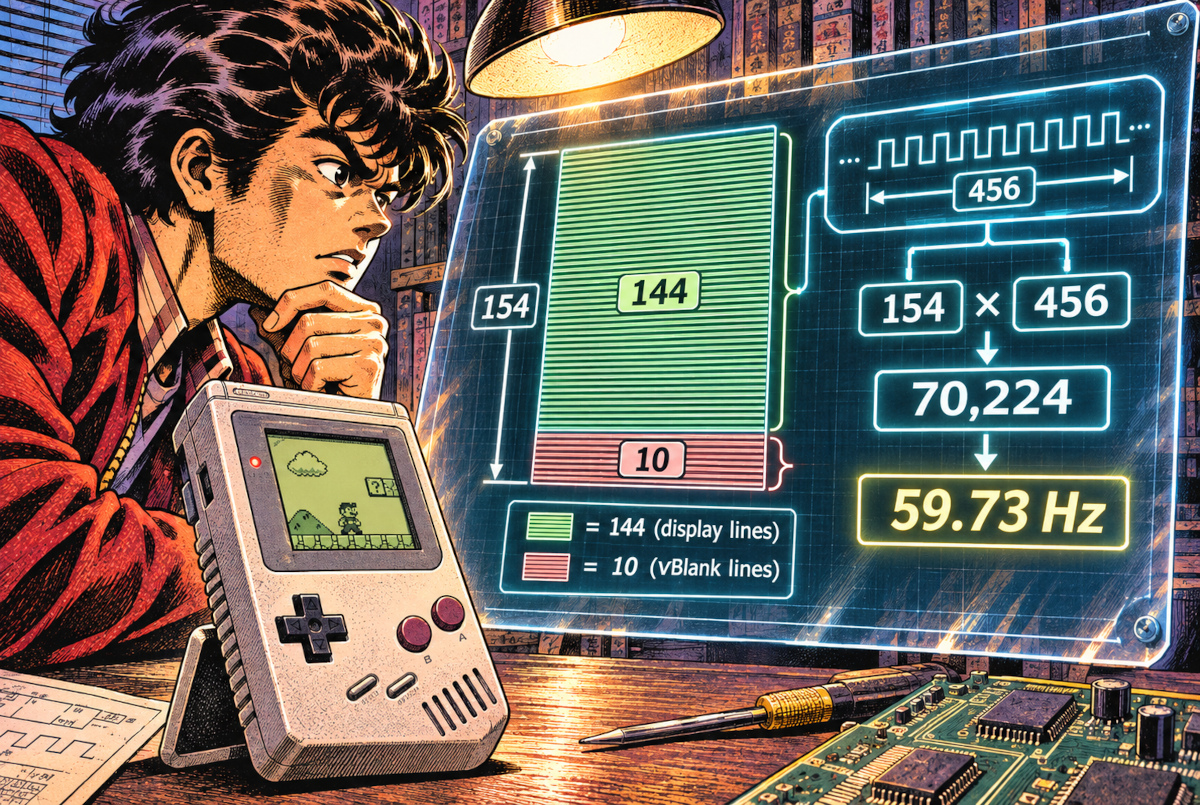
Simplified diagram of the original Game Boy’s display timing. One frame takes 456 × 154 = 70,224 timing units. Dividing the 4,194,304 Hz clock by that figure gives approximately 59.73 Hz. Green represents 144 visible scanlines; red represents ten VBlank scanlines. The red section is a timing illustration, not a colored strip visible on the real LCD.
An accurate emulator has to reproduce what the console does even when nothing new is appearing on the screen.
That is the real distinction between getting a game to launch and reproducing the original hardware faithfully.
Better Graphics Are Not the Same as Better Emulation
Modern emulators can provide features the original machines never had: higher rendering resolutions, improved visual output, save states and other conveniences.
Those enhancements can make older games much more enjoyable on modern displays. But they do not automatically make an emulator more accurate.
A program might run faster because some hardware behavior has been simplified. That improvement could work perfectly for one game while causing broken graphics, incorrect sound or unexpected crashes in another.
MAME’s official documentation makes a particularly revealing distinction. Its primary purpose is to document and preserve the inner workings of older electronic systems. Running the original software is also a way to test whether that reconstruction is correct.
There is a difference between making a game playable and demonstrating that its original machine has been faithfully recreated.
There is also a legal distinction worth keeping in mind. Emulator software and copyrighted game data are separate things. Owning a cartridge or disc does not automatically authorize every method of copying, downloading or distributing the software. The applicable rules depend on the jurisdiction and the circumstances.
Now AI Is Entering the Workshop
For decades, emulator developers have studied hardware specifications, written low-level code, compared their results against real machines and hunted down bugs that sometimes appear only in a handful of games.
As of 2026, developers are experimenting with AI assistance for technical research, code generation, debugging and performance analysis.
That does not eliminate the need for accurate hardware knowledge or testing. But it changes who can participate in the development process and how some of that work can be approached.
So how much faster can an established emulator become with AI-assisted modifications?
In the next installment, we examine a modified PlayStation 4 emulator whose developer reported nearly twice the frame rate in a particular scene of The Last Guardian. We will look at what was changed, what the numbers actually mean and whether a speed improvement necessarily makes an emulator better.
Editor’s Note
At first, I figured emulation was mostly a translation job. Take the old machine’s instructions, convert them into something a modern processor understands, and off you go.
Then I ran into those ten invisible Game Boy scanlines.
Ten lines out of 154. Almost 6.5% of the entire frame. Nothing visible to the player, yet the timing still matters. That is exactly the sort of detail a casual explanation leaves out, and exactly the sort of detail that can make an emulator developer miserable.
The IBM connection was another surprise. Engineers were already helping old programs survive new hardware in the 1960s, long before anyone was worrying about preserving a Famicom cartridge.
Perhaps that is what I like most about emulation. It is a stubborn refusal to accept that a machine’s behavior should vanish just because the machine itself has become obsolete.
And when you get down to it, making a computer faithfully impersonate another computer is a wonderfully obsessive pursuit.
EMU: Game Console Emulation - Seven-Part Series
How can an old game console run on a modern PC? Across seven articles, we explore the history and technology of emulation, AI-assisted improvements, the challenges of recreating complex hardware, and the future of game preservation.
- Part 1: Why Can a Famicom Game Run on a PC? Emulation’s Roots Go Back to 1965
- Part 2: English edition Coming soon
- Part 3: English edition Coming soon
- Part 4: English edition Coming soon
- Part 5: English edition Coming soon
- Part 6: English edition Coming soon
- Final Part: English edition Coming soon
Terms That May Need a Quick Explanation
- ROM Image
- A file containing data copied from a game cartridge or another storage medium. It is separate from the emulator software.
- BIOS
- Basic firmware that initializes or supports a machine’s operation. Some emulated systems require original or compatible firmware to function correctly.
- Microcode
- Low-level instructions used to control operations inside a processor. IBM used microcode in the System/360 Model 30’s compatibility features for older systems.
- Vertical Blanking Period (VBlank)
- A period in the display cycle when the system is not drawing visible scanlines. Other hardware and software activity can still take place during this interval.
References
- IBM: The IBM 1401 — Official history of the IBM 1401, introduced in 1959.
- IBM: The IBM System/360 — Official history of the computer family announced in 1964.
- Computer History Museum: IBM System/360 Model 30 — Historical record of the 1965 machine and its ability to emulate the IBM 1401.
- Nintendo: September 30, 2016 News Release (Japanese) — Confirms the original Famicom’s July 15, 1983 launch in Japan.
- FCEUX Documentation: NES Processing — Technical reference for emulating the NES CPU and PPU.
- MAMEDEV Wiki: MAME 0.1 — Release date and supported games for the February 5, 1997 version.
- US Court of Appeals for the Ninth Circuit: Sony Computer Entertainment v. Connectix, 203 F.3d 596 (2000) — Court opinion concerning reverse engineering, intermediate copying and fair use.
- Nintendo: March 26, 2009 News Release (Japanese) — Official figures for 426 Virtual Console titles across eight older platforms, plus the launch of six separate arcade titles.
- Pan Docs: Rendering Overview — Game Boy scanline timing, 144 visible lines, ten VBlank lines and the approximately 59.73 Hz frame rate.
- MAME Documentation: What Is MAME? — The project’s purpose of documenting hardware behavior and preserving software history.